Features
All daily planner features at a glance
What DayPlan does on iPhone, iPad and Apple Watch – and what is part of Premium.
Time blocks on a timeline
In the day view every task is a colored block on the timeline. Tap an empty spot and DayPlan suggests a new block there. Hold a block to move it, change its length with the handles, or mark it done, send it to the inbox or delete it.
- Now line and progress for the day
- Day view for every day, free
- Save a day as a template and apply it to other days
- iPhone

Three days and month
The three-day view shows the next days side by side – you can drag blocks from one day to the next. The month calendar marks the days that have something planned, with the agenda of the selected day below.
- Three days from today and the current month free
- Browse as far as you like with Premium
- iPhone

Tasks with subtasks, notes and repeats
Each task can have a time, duration, category, icon, subtasks, a note and a reminder. Pick repeats from a short list: every day, every weekday, every weekend day, every week, every two weeks, every month, every year or your own rule.
- Built-in categories free, custom categories with Premium
- Reminder before the start, lead time of your choice
- iPhone

Inbox, search and sharing
The inbox holds everything that doesn’t have a time yet. Hide what’s done, and search finds tasks by title and notes. Send links and text from Safari, Mail or Notes straight to the inbox via Share.
- iPhone
- Apple Watch

Routines
Save sequences like a morning routine, a workout or a deep work block as a routine and add them to your day with one tap. Tasks left over from yesterday move to today, tomorrow or back to the inbox.
- iPhone

Calendar, Live Activity and Siri
Events from Apple Calendar appear in the day view for free, read-only. DayPlan shows the running task as a Live Activity on the Lock Screen. With Siri and the Shortcuts app you add tasks without opening the app.
- Calendar events in three-day and month views with Premium
- Home Screen widgets with Premium
- iPhone
Statistics and day notes
With Premium, statistics show how much you completed and planned by day, week and category. Day notes with Premium capture what mattered to you on a given day.
- iPhone

Apple Watch
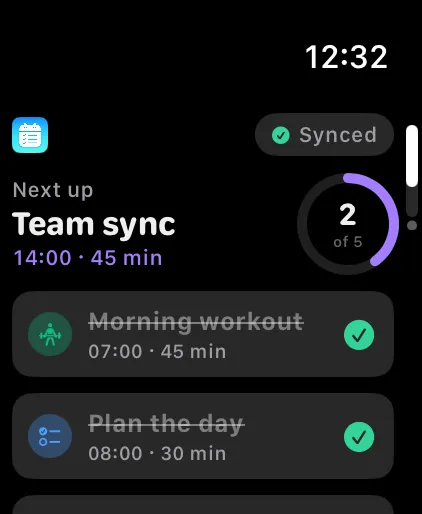
The Apple Watch app is part of Premium and shows what’s next, today’s tasks to check off, your inbox and your weekly progress. The data comes from your iPhone.
- Apple Watch
What’s available on which device?
iPhone and Apple Watch compared. iPad does everything iPhone does. An Android app is planned.
| Feature | iPhone | Apple Watch |
|---|---|---|
| View today’s plan | available | with Premium |
| Check off tasks | available | with Premium |
| Inbox | available | with Premium |
| Create and move tasks | available | not available |
| Three days and month | available | not available |
| Repeats and routines | available | not available |
| Reminders | available | not available |
| Apple Calendar (day view) | available | not available |
| Live Activity | available | not available |
| Statistics | with Premium | not available |
| Weekly progress | with Premium | with Premium |
| Widgets | with Premium | not available |
| iCloud sync | with Premium | not available |
✓ available · ✓ᴾ with Premium · – not available
Ready for a clear day?
Download DayPlan for free and plan your first time block today.
 plannedAndroid